Step #2: Schedule Your Subscription
A Monthly Order Has Lots of Benefits!
Subscription Benefits:
✅ Convenience: Your products appear magically every four weeks, right when you need them!
✅ Lowest price: Get the full 30% discount on all products! You must have an active subscription to receive the discount.
✅ Commission Qualified: With a Subscription of at least 100 points, your purchase will process exactly when it should to keep you eligible to earn with Partner.Co !
HOW TO INSTRUCTIONS:
Log into: https://officev2.partner.co/account
Click on "Subscription Manager" under the 3 lines Menu bar on the top left-hand corner or click on the Subscribe button on your main dashboard.
Click on "Add New Subscription"
You can search for the products you want with the 🔍 on top > Add to Cart > Click on the 🛒 to "Continue to Checkout"
✅ 100PV in product minimum to be commissions qualified
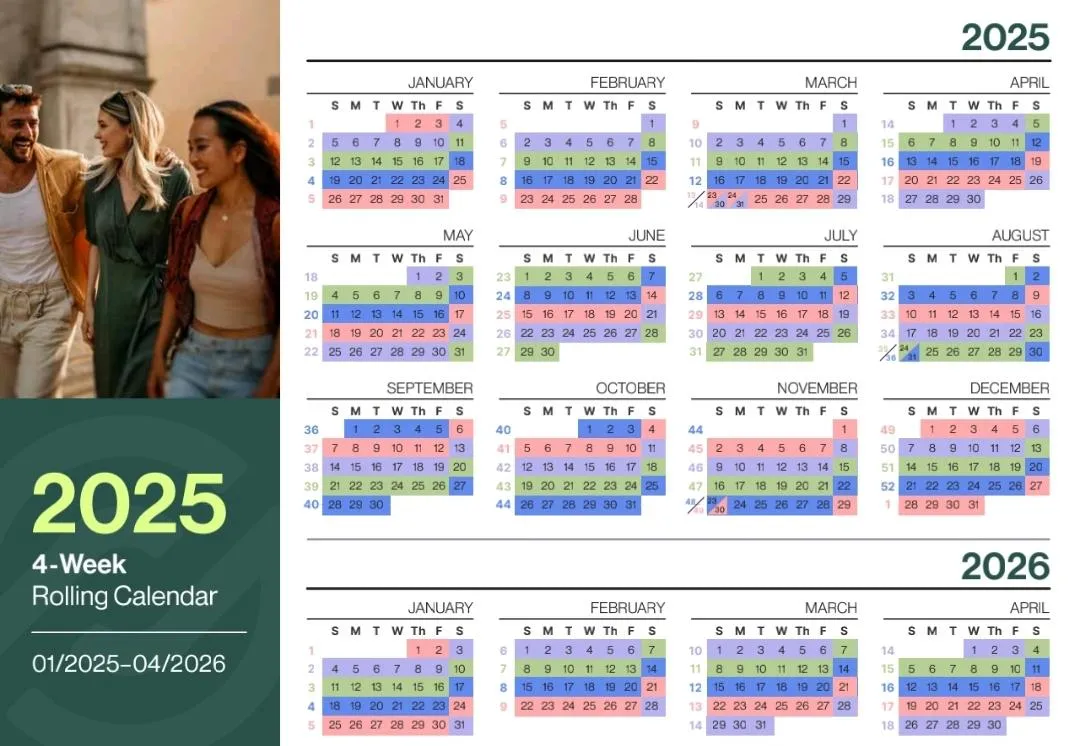
Select the 🗓️ based on the color of your qualification week (this can be found on your Dashboard)
Continue to fill out the rest of the information > Review Subscription > Confirm & Submit (once you confirm you will get a order confirmation)
Once your subscription is set up you can always edit your products, however don't change your date it will automatically keep your 4 week schedule. Make sure and Review your order and Confirm and Submit.
✅ 100PV in product minimum to be commissions qualified
2025 - 4 WEEK ROLLING CALLENDAR